Website vs Business Management System: What Does Your Company Need?
How to decide between a marketing site, a dashboard, a portal, or a full operating system for your business.

Entrepreneur and Coach
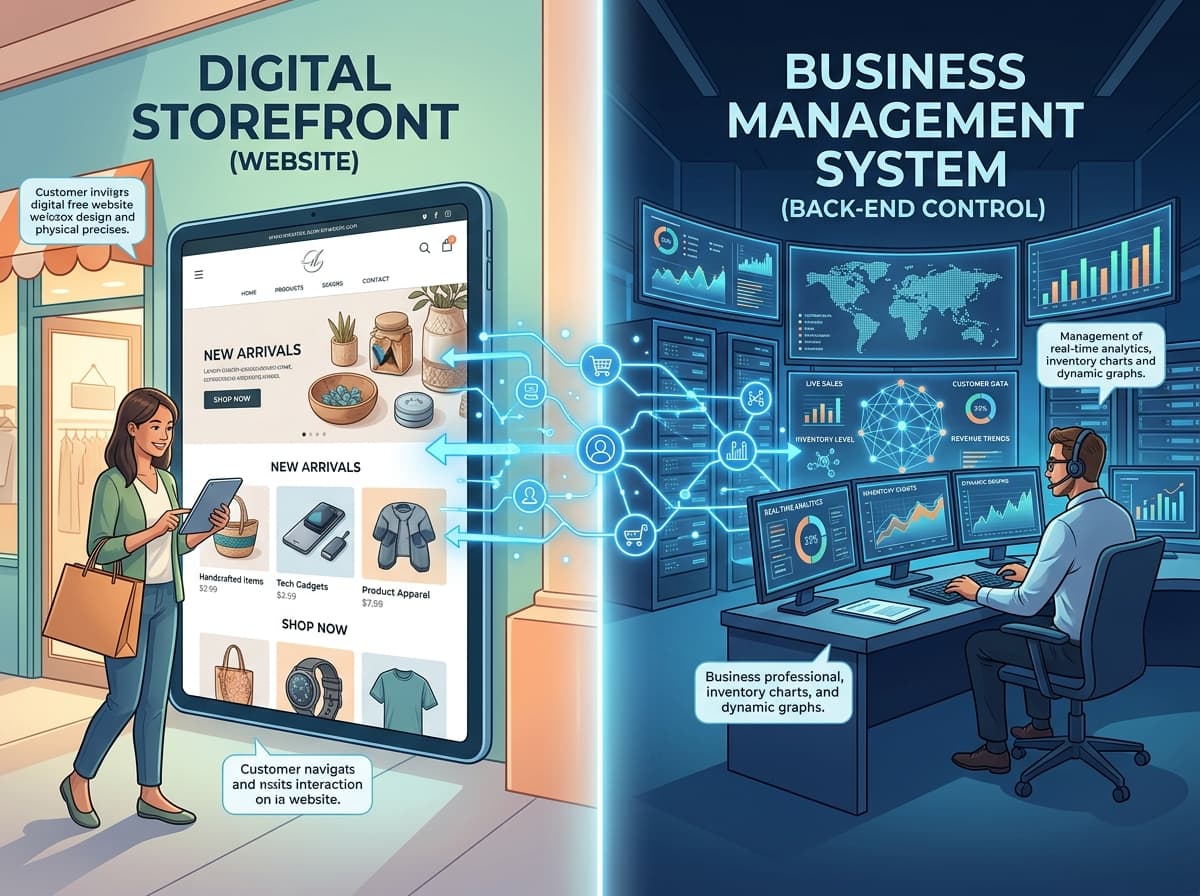
Every growing business eventually hits a technological ceiling. You launch a website to establish credibility, and it works—customers find you. But as your transaction volume increases, a new problem emerges. Behind your beautiful digital front door, your operations are running on chaotic WhatsApp threads, overflowing email inboxes, and fragmented spreadsheets.
This operational friction forces a critical question: Does your business just need a better website, or is it time to invest in a complete business management system?
Treating these solutions as interchangeable is one of the most expensive mistakes a business can make. A professional marketing website might be exactly what one company needs to generate leads, while another might require secure customer portals, automated workflows, and internal databases just to survive the workday.
Here is how to determine exactly what level of digital infrastructure your business needs—without overbuilding, and without forcing your team to operate with technology that is too limited for your growth.
The Digital Maturity Spectrum
Technology is not one-size-fits-all. Instead of viewing your options as a rigid, binary choice between a "website" or "custom software," it is far more useful to view business technology across a maturity spectrum. Solutions range from purely public-facing to purely operational.
Level 1: The Marketing Website (The Digital Storefront)
What it is: A public-facing digital brochure designed to help people discover and understand your business.
Primary purpose: Visibility, credibility, and brand positioning.
What it does well: It displays business information, outlines your services, hosts your blog, improves SEO, and provides contact information. It acts as the foundational digital signpost that proves your business is legitimate.
What it does not do: A marketing website is passive. It does not process complex logic, route internal tasks, or manage customer records. It simply displays information and waits for the user to act.
Who needs it: New startups, local shops, and independent consultants who primarily need to be found online and establish initial trust.
Level 2: The Interactive Website (The Conversion Engine)
What it is: A website that goes beyond static information by actively allowing users to take specific actions.
Primary purpose: Lead generation and structured customer interaction.
Typical features: Quote request forms, online booking calendars, automated lead capture, interactive calculators, product catalogs, and basic e-commerce payments.
Who needs it: Service providers, retail stores, and agencies that need to convert web traffic into structured inquiries or direct sales, rather than just hoping a visitor makes a phone call.
Level 3: The Customer Portal (The VIP Lounge)
What it is: A secure, authenticated digital environment where clients can log in to access personalized information.
Primary purpose: Client retention, self-service, and reducing the manual burden on customer support.
Typical features: Personalized user accounts, order tracking, secure document sharing, invoice management, booking history, and active support ticket systems.
Who needs it: B2B companies, wholesalers, educational institutions, or ongoing service providers whose customers frequently need to access their records, download files, or track progress without calling the office.
Level 4: The Internal Dashboard (The Manager’s Desk)
What it is: A private, employee-facing interface used to view and manage business data.
Primary purpose: Centralizing fragmented information to give staff and management a clear, unified view of operations.
Typical features: Sales pipelines, lead tracking, inventory levels, staff schedules, analytics, and operational reports.
Who needs it: Businesses with multiple employees where relying on shared spreadsheets or disjointed email chains is causing critical information to fall through the cracks. Dashboards pull data into one readable place.
Level 5: The Business Operating System (The Engine Room)
What it is: A fully connected digital environment that integrates multiple business processes, internal users, databases, and automations into a single unified engine.
Primary purpose: Complete operational efficiency, automation, and scalable growth.
Typical features: Centralized CRM and ERP databases, role-based permissions, automated financial workflows, inventory integrations, triggered notifications, and AI-powered features to analyze data or predict trends.
Who needs it: Mature or rapidly scaling businesses where different departments must communicate seamlessly. A true business operating system means that when a customer places an order on the website, inventory is instantly updated, the warehouse is notified, and accounting generates an invoice—all without manual human intervention.
How to Choose: A Practical Decision Framework
The easiest way to decide what to build is to identify the exact friction point in your business. Ask yourself: What is the primary problem we are trying to solve right now?
- If the problem is: "People cannot find or understand our business."
Your priority is a Marketing Website. You need a clear brand message and search visibility. - If the problem is: "Customers visit, but they don't buy or contact us."
You need an Interactive Website. You must remove the friction of getting a quote, booking a call, or making a purchase. - If the problem is: "Our team spends hours answering basic customer questions and resending invoices."
You likely need a Customer Portal to allow clients to self-serve securely. - If the problem is: "Management has no idea how many leads we have, what our inventory looks like, or what staff are doing."
An Internal Dashboard is required to centralize operational visibility. - If the problem is: "Different parts of our business operate separately, requiring constant manual data entry between systems."
You are ready for a connected Business Management System.
Technology Decision Table
| If your main need is... | Consider... | Why it works |
|---|---|---|
| Building credibility & SEO | Marketing Website | Establishes a professional baseline and helps prospects find you on Google. |
| Capturing leads & sales | Interactive Website | Automates the intake process with forms, catalogs, and bookings. |
| Giving clients account access | Customer Portal | Allows secure logins for document sharing, order tracking, and history. |
| Monitoring performance | Internal Dashboard | Pulls data from various sources into one visual hub for management. |
| Connecting multiple workflows | Business Management System | Eliminates manual data entry by making all departments share one database. |
5 Signs Your Business Has Outgrown Its Website
How do you know when it is time to move beyond a basic website and invest in operational software? Look for these practical indicators:
- Repetitive Data Entry: Your employees are manually copying customer information from a website email into a spreadsheet, and then into an invoicing tool.
- Spreadsheet Chaos: Important business data is scattered across personal hard drives, WhatsApp messages, and dozens of disconnected Google Sheets.
- Customer Blind Spots: When a client calls, your team has to check three different systems to figure out the status of their project or order.
- Information Bottlenecks: Customers repeatedly call or email to ask for tracking updates, copies of past receipts, or appointment confirmations that they should be able to check themselves.
- Transaction Overload: You have hit a volume where manually processing each new customer, sale, or request is taking up more time than actually delivering the service.
When You Should NOT Build a Custom System
As a strategic digital growth partner, we often tell businesses when not to build complex software. Custom technology is not automatically better. You should avoid building a custom management system if:
- Your processes are still simple. If you only have ten clients a month, a basic CRM or even a well-organized spreadsheet is perfectly fine.
- Off-the-shelf software solves the problem. If an existing SaaS product (like QuickBooks for accounting or Shopify for retail) does exactly what you need, use it. Do not rebuild what already exists cheaply.
- You are still validating your business model. Do not automate a process until you have proven that the process actually makes money.
- The ROI isn't there. If building a custom automation saves an employee 10 minutes a week, the development cost is not justified.
Real-World Scenarios: What Different Businesses Need
To put this into perspective, let’s look at how the right technology scales alongside different types of businesses.
Example 1: A Local Service Business (e.g., Plumbing or Landscaping)
This business primarily needs credibility and discoverability. A professional Interactive Website is sufficient. It allows customers to find the business on search engines, read reviews, and fill out a request form that texts the owner directly. A full management system would be overkill.
Example 2: A Growing Logistics Company
A logistics firm cannot survive on a brochure website. They need an Internal Dashboard to manage dispatching and fleet locations, combined with a Customer Portal where clients can log in to track their specific freight and download bills of lading securely.
Example 3: A Scaling Retail Brand
A retail business usually starts with an e-commerce website. But as they grow to multiple physical locations and high online volume, they need a Business Operating System. This ensures that when a physical item is sold in-store, the online website inventory instantly drops by one, preventing accidental overselling.
Example 4: A Professional Consulting Firm
A consulting business deals in time and documents. They need a system that handles automated bookings, secure client onboarding via a portal, and internal project management dashboards to ensure consultants are hitting their billable hours.
Digitalize. Simplify. Grow.
The goal of technology is not to make your business look "techy." The goal is to make your business easier to find, easier to manage, and easier to scale.
At teChia Digital Solutions, we believe every business deserves the right digital solution for its specific stage, goals, and operational reality. If you are struggling to manage growth, it might be time to stop upgrading your digital front door, and start building a better system behind it.
Frequently Asked Questions
What is the difference between a website and a web application?
A website primarily displays informational content (like text, images, and blogs) for users to read. A web application is an interactive software program accessed through a browser (like Gmail, a banking portal, or a CRM) where users can manipulate data, make transactions, or manage accounts.
When should a small business consider custom software?
A business should consider custom software only when off-the-shelf solutions no longer fit their unique workflows, when manual administrative tasks are crippling growth, or when disparate systems refuse to communicate with one another.
Can a business start with a website and add a management system later?
Yes. This is the recommended path. Start with a strong marketing and interactive website to drive revenue. Once the business has consistent cash flow and operational bottlenecks begin to form, you can integrate dashboards, portals, and management systems.
How much technology does a small business actually need?
Only enough to solve current friction points. If your main problem is visibility, you need a website. If your main problem is data chaos, you need a management system. Never build technology for the sake of having technology.